Examples
The MicroPythonMCU.Examples package holds 38 ready-to-simulate models: open the model, simulate, plot the listed variables. Each one runs the program named in the "Program" column, to be read alongside: in Resources/Scripts/MCU/Resources/Verification/(V) . The examples also serve as scenarios for the library's verification suite. Program comments and printed messages are in French.
Getting started
Example
What it shows
What to watch
Program
BasicBlinkThe default program: GP0 and the on-board LED blink at 0.5 Hz
mcu.GP0.v, LED iconsdemo.py
Digital pins (Examples.Gpio)
Example
What it shows
What to watch
Program
Gpio.LedChaserChaser on 8 LEDs placed around the microcontroller
LED icons (animated replay)
led_chaser.py
Gpio.PinEchoGP1 toggles, GP2 reads back its electrical state, GP3 copies itmcu.GP1.v, mcu.GP3.vpin_echo.py
Gpio.InputReactivityA button on GP1 wakes the program during a sleep(3600)
mcu.GP1.v, program outputinput_reactive.py (V)
Gpio.TimingCost of a pin access (gpioOpTime): on()/off() pulse without sleep, burst, busy-wait, masked IRQ
mcu.GP0.v (zoom to the µs)gpio_timing.py (V)
Gpio.PullInternal pull resistors: two buttons without any external resistor (Pin.PULL_UP to ground, Pin.PULL_DOWN to 3.3 V), and a pin whose pull changes against a 1 MΩ external resistor
mcu.GP0.v, mcu.GP3.v, mcu.GP4.vgpio_pull.py
Example
What it shows
What to watch
Program
Adc.ReadGP1 as an analog input on a voltage divider (≈ 2.2 V); threshold copied to an LEDmcu.GP1.v, mcu.GP0.vadc_read.py
Adc.SleepAn analog input crossing the logic threshold does not wake the program
mcu.GP0.v, mcu.GP1.vadc_sleep.py
PWM (Examples.Pwm)
Example
What it shows
What to watch
Program
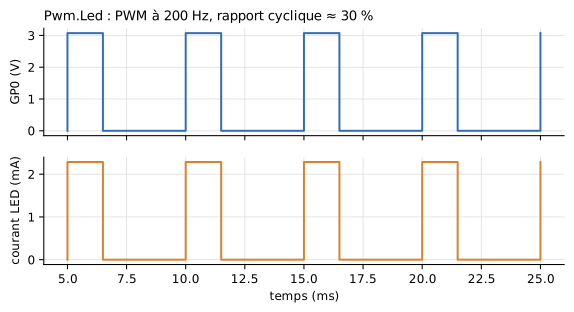
Pwm.Led200 Hz PWM, duty cycle ≈ 30 %
mcu.GP0.v, led0.p.ipwm_led.py
Pwm.LedFadeGradual change of the duty cycle: the LED fades in
LED icon, led0.p.i
pwm_led_fade.py
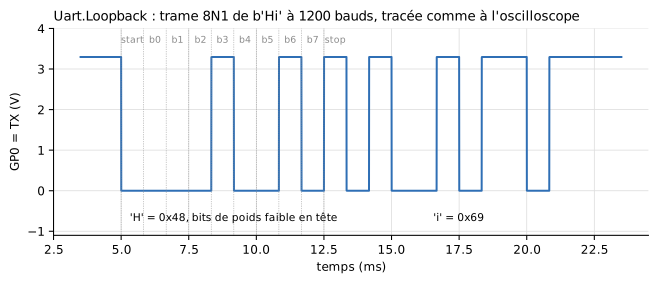
Figure labels are in French: « temps » = time, « courant LED » = LED current, « rapport cyclique » = duty cycle.
Interrupts and timers (Examples.Irq)
Example
What it shows
What to watch
Program
Irq.PinPin.irq() on rising edges only: the LED toggles on each rising edge of the square wavemcu.GP1.v, mcu.GP0.vpin_irq_demo.py (V)
Irq.TimerA 500 ms periodic Timer toggles an LED while the program sleeps
mcu.GP0.vtimer_toggle.py (V)
Program execution (Examples.Program)
Example
What it shows
What to watch
Program
Program.SleepCompressionTwo sleep(3600) simulated in a fraction of a second of computation
simulation duration
sleep_long.py (V)
Program.ErrorAn uncaught exception stops the simulation, Python traceback in the log
log
script_error.py (V)
Program.ImportsImport of a module placed next to the program and of a library from another folder (libraryPath)
LEDs on GP0 and GP1
import_demo.py
File system (Examples.FileSystem)
Example
What it shows
What to watch
Program
FileSystem.BootNo script: boot.py then main.py of a flash image; ADC readings logged to /data/measurements.csv
copy folder (opened at the end of the simulation)
datalogger/ image
FileSystem.Scriptboot.py from the flash, then an external program instead of main.pylog, written files
fs_script.py
Teaching display (Examples.Display)
Example
What it shows
What to watch
Program
Display.DemoTwo messages sent to a Peripherals.Display; the first one moves down to line 2
display icon, log
display_demo.py
Serial link (Examples.Uart)
Example
What it shows
What to watch
Program
Uart.Loopback8N1 frame looped back onto the microcontroller
mcu.GP0.vuart_loopback.py
Uart.EchoPyDialogue with an echo device described by a Python script
mcu.GP5.v, mcu.GP4.v, loguart_echo.py
Uart.EchoSame setup, echo set in the device's table
same
uart_echo.py
Uart.SensorQuerying a temperature sensor, then sending a setpoint
sensor.valueOut[1], loguart_sensor.py
Uart.RegulationClosed-loop control through the serial link alone
plant.y, sensor.valueOut[1]uart_regulation.py
Uart.GpsPyA GPS module sends its frames without being asked
log
uart_gps.py
Uart.StateMachinePyDevice whose reply depends on its history (Python state machine)
log
uart_state_machine.py
Uart.LcdTwo lines written to a 20x2 serial display
display icon
uart_lcd.py
I2C bus (Examples.I2c)
Example
What it shows
What to watch
Program
I2c.EchoWriting and reading back a frame, reading a register after a repeated START
echo.SDA.v, echo.SCL.vi2c_echo.py
I2c.MultiDeviceThree devices on a 400 kHz bus, found by scan()
log
i2c_multi.py
I2c.NoPullUpBus without external pull-up resistors: the internal pull-ups alone (50 kΩ) are too slow at 400 kHz, OSError(ETIMEDOUT)
slow rising edges, log
i2c_nopullup.py
I2c.GroveLcdGrove LCD RGB display driven by an unmodified off-the-shelf driver
display icon
i2c_grove_lcd_rgb.py
Several microcontrollers (Examples.MultiMcu)
Several MCU blocks in the same model, each with its own program (see Several microcontrollers ).
Example
What it shows
What to watch
Program
MultiMcu.IndependentTwo boards run the same program and import the same module: each keeps its own state
mcu1.GP1.v, mcu2.GP1.v, prefixed logmulti_counter.py
MultiMcu.HandshakeREQ/ACK handshake over two wires, B answers from a Pin.irq
mcuA.GP0.v, mcuB.GP1.vhandshake_a.py, handshake_b.py
MultiMcu.UartCrossed serial link: A sends PING, B answers PONG
mcuA.GP0.v, mcuB.GP0.v, loguart_ping.py, uart_pong.py
MultiMcu.FileSystemTwo data loggers start from the same flash image: one copy each
folders mcu1_datalogger_*, mcu2_datalogger_*
boot.py/main.py of datalogger
MultiMcu.I2cI2C bus between two boards, B is a target in memory mode (I2CTarget(mem=...))
mcuA.GP5.v, LED of B, logi2c_controller.py, i2c_target_mem.py
MultiMcu.I2cIrqSame bus, B answers commands from an I2CTarget.irq() handler
log
i2c_controller_irq.py, i2c_target_irq.py
Weighing (Examples.Weighing)
Example
What it shows
What to watch
Program
Weighing.Hx711ReadReading an HX711 with robert-hh's driver: gain 128, gain 64, power-down and wake-up
hx.code, hx.PD_SCK.v, hx.DOUT.v, displayhx711_read.py
Weighing.KitchenScaleComplete kitchen scale, TARE button
display icon
kitchen_scale.py